The early days of CI
In the early days of Hudson CI, if you wanted to run continuous integration tests, you deployed the Hudson server on a computer under your desk. You then used other computers around the office as workers. When you or one of your coworkers pushed changes to Subversion, Hudson detected them by polling Subversion. It sent the information to one of the workers, where your test scripts ran and reported the results to Hudson.
About 20 years later, the basic premise has not changed much. You now delegate all that work to GitHub. GitHub monitors your Git repositories and triggers and queues the events that GitHub Actions needs to process. Finally, GitHub decides where to allocate and run your tests.
GitHub has a little escape hatch that allows you to run workflow steps on any machine that you control. These machines are called self-hosted runners. To create runners when jobs enter the queue, you configure a separate workflow_job webhook. Your service receives the webhook and creates a runner for the job. Finally, if you want faster workflow runs, you will probably want to keep your own cache instead of delegating it to GitHub again.
In the cloud-native era, you would probably use cloud provider primitives to handle some of that complexity. You configure API Gateway to receive webhook notifications from GitHub and connect it to an SQS queue. Then you write a small Lambda function that processes the events in the queue. That function decides where to run your tests, perhaps on a bare-metal machine or in a microVM. Once it makes that decision, you put the event in a new SQS queue dedicated to the selected worker. Finally, that worker pulls the event and runs your tests. You also attach network storage for caching. After a few thousand lines of Terraform, you have a pretty robust solution. Claude or Codex can probably build this for you in a few minutes.
What comes next
At Tensorlake, we think a lot about better cloud primitives that help you and your agents run and test code. One interesting use case among our customers is hosting their own CI infrastructure.
A serverless durable execution framework
Tensorlake Orchestrate gives you a durable execution framework with a built-in admission queue. It can handle thousands of CI webhook requests with little effort or maintenance. This is all the code you need to handle GitHub Actions triggers:
@application(allow=["unauthenticated_requests"])
@function(secrets=["GITHUB_WEBHOOK_SECRET"])
def github_webhook(body: HttpBody) -> dict[str, str]:
    headers = RequestContext.get().headers

    if headers.get("X-GitHub-Event") != "workflow_job":
        return {"status": "ignored"}

    if not verify_signature(
        body.content,
        headers.get("X-Hub-Signature-256"),
        os.environ["GITHUB_WEBHOOK_SECRET"],
    ):
        return {"status": "rejected"}

    event = body.json()
    return {"status": "accepted", "action": event.get("action", "")}
You can deploy this code by saving it to an app.py file and running tl app deploy app.py from your terminal.
Warm sandboxes for each test shard
Because our product is completely scriptable, you can start a Tensorlake Sandbox from that same function. The sandbox runs GitHub's self-hosted runner software and executes all the steps declared in your workflow:
sandbox = await AsyncSandbox.create(
    image=RUNNER_IMAGE,
    cpus=resources.cpus,
    memory_mb=resources.memory_mb,
    disk_mb=resources.disk_mb,
    timeout_secs=RUNNER_TIMEOUT_SECS,
)
This sends the work to our sandbox scheduler, which places it in a microVM with the resources you specify.
Because a CI job can run for a while, we don't hold it open over a single long-lived connection. We start the runner as a background process and check on it on a short interval, reporting progress each time so the function stays alive for as long as the job needs. When the runner exits, we tear the sandbox down.
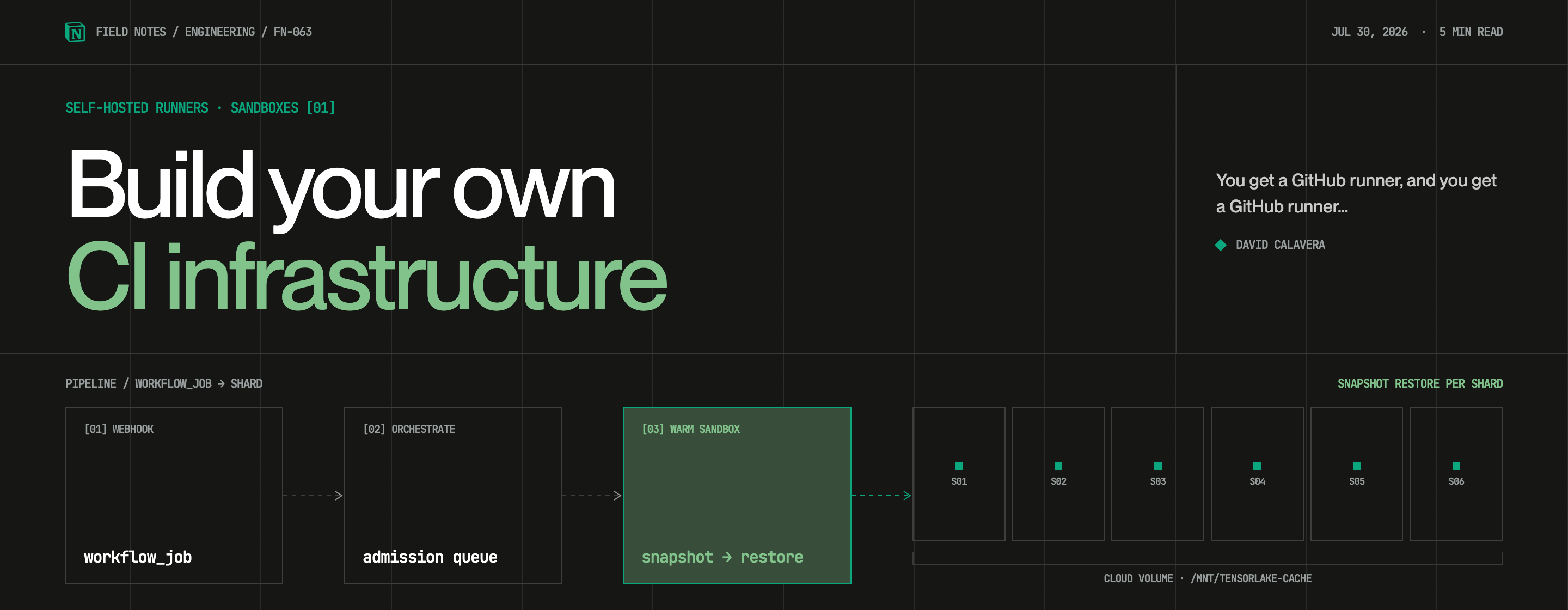
To make this even faster, we prepare test shards before the work begins. We install the dependencies, start the required services, and create a sandbox snapshot. Then, we restore that snapshot for each test shard. Every shard runs in parallel with the same filesystem and memory state, but without duplicating the preparation work.
A persistent cache for ephemeral runners
To give you persistent caches for build artifacts, Tensorlake Cloud Volume mounts a shared filesystem into the test shard.
Each restored sandbox mounts the repository before the GitHub runner starts in /mnt/tensorlake-cache. We mount it as root so the filesystem daemon can raise its open-file limit — every open file on the volume keeps a descriptor around, and a busy build opens a lot of them — while still handing the volume to the unprivileged user that runs your workflow:
sudo tl fs mount <repository-volume> /mnt/tensorlake-cacheAfter the shard finished, we synchronize the cache and unmount the volume automatically:
sudo tl fs unmount /mnt/tensorlake-cacheWe think this is an elegant solution. We use it for some of our own CI workflows. It reduces our CI costs and removes the need to maintain several disconnected cloud primitives stitched together with Terraform.
You can see all the components working together in this diagram:
Try it yourself
We've made the whole implementation open in tensorlake-github-runners. Clone that repository, run scripts/configure-github-org.sh, and you get to enjoy you own dedicated CI infrastructure.
Give it a try, free yourself from expensive cloud bills, and have fun building your own CI infrastructure.
P.S. Yes, you can run it under your desk if you wish.