Building a Production-Ready GraphRAG Pipeline with TensorLake
TL;DR
TL;DR GraphRAG extends traditional RAG by introducing a graph layer on top of vector retrieval, enabling multi-hop reasoning across semantically and conceptually related document chunks rather than isolated similarity matches. TensorLake provides the execution backbone for the entire GraphRAG pipeline, handling document ingestion, long-running workflows, containerized execution, and scalable deployment without custom infrastructure. The system combines vector search and graph traversal by using embeddings for fast retrieval and a knowledge graph for structured context expansion, resulting in more complete and grounded answers. The end-to-end setup is production-ready, supporting local testing, secure secret management, API-based deployment, and request-level observability through TensorLake’s managed runtime and cloud dashboard.
Retrieval Augmented Generation (RAG) is commonly implemented using document chunking and vector similarity search. While this approach works for simple queries, it treats chunks as independent units and fails when answers require reasoning across multiple sections of a document.
GraphRAG extends standard RAG by adding structure. Document chunks become nodes in a graph, and semantic or conceptual relationships form edges. Instead of relying on a single retrieval step, queries expand context through graph traversal, enabling multi-hop reasoning and better coverage.
In this tutorial, we build and execute a complete GraphRAG pipeline, covering ingestion, graph construction, querying, local testing, and deployment in a production-ready setup.
GraphRAG and the Problems It Solves
Traditional RAG pipelines rely on a single retrieval step driven by vector similarity. While efficient, this approach assumes that the most relevant information exists within a small set of isolated chunks.
In practice, many real-world queries require reasoning across multiple sections that are semantically related but not necessarily close in embedding space.
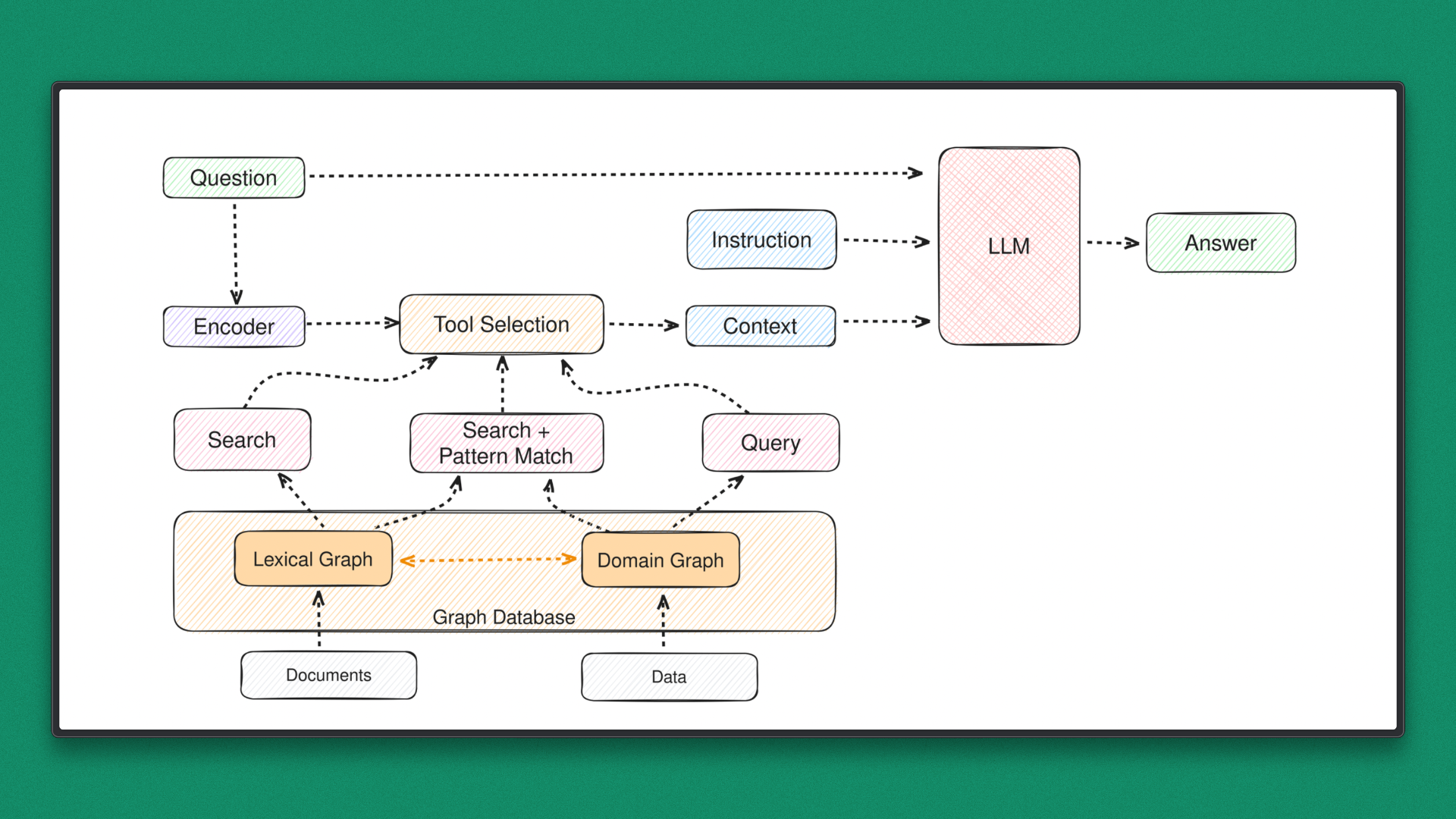
GraphRAG introduces structure on top of retrieval. Each document chunk becomes a node, and edges capture relationships such as semantic similarity, shared concepts, or contextual overlap. Query execution no longer stops at retrieval. Instead, it starts there and expands through the graph to gather additional, connected context.
That said, GraphRAG also introduces new challenges. Graph construction is compute-intensive, traversal logic can be complex, and managing ingestion, embeddings, and execution pipelines quickly becomes operationally heavy. Without the right infrastructure, GraphRAG systems are difficult to scale, deploy, and maintain reliably.
Why Most GraphRAG Implementations Break in Production
Most GraphRAG examples work in notebooks.
Production introduces:
- Long-running graph construction
- Retry coordination
- Parallel embedding generation
- State persistence
- Deployment + API exposure
This tutorial explores a different approach: using object-storage-native execution with a managed runtime that handles durability, scaling, and orchestration.
TensorLake in the GraphRAG Stack: Infrastructure That Makes It Practical
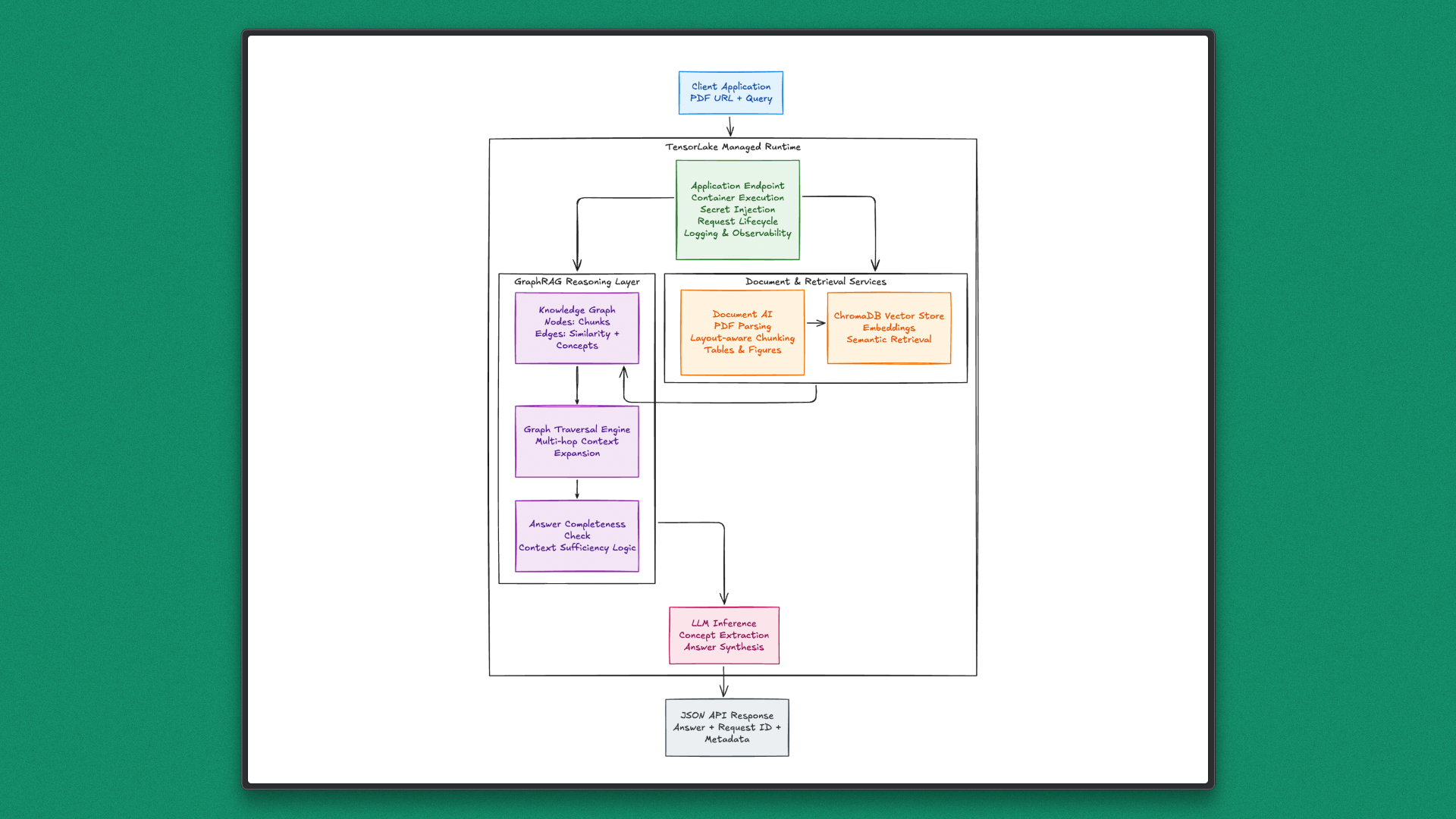
As mentioned earlier, GraphRAG systems only work well when the underlying infrastructure can reliably handle documents, long-running workflows, and scalable execution. This is where TensorLake fits naturally into the picture. Instead of being just another AI framework, TensorLake acts as a runtime and execution layer designed specifically for modern, document-heavy, and agent-driven AI systems.
Core Services and Capabilities
TensorLake brings together several essential services that simplify how developers build and deploy AI applications:
- Document Ingestion and Parsing: Converts PDFs and other unstructured files into structured, layout-aware data that can be directly used for retrieval and reasoning workflows.
- Serverless Execution for AI Agents: Runs Python-based AI applications without manual infrastructure setup, automatically scaling with workload.
- Durable and Fault-Tolerant Workflows: Supports long-running and multi-step executions, ensuring workflows resume correctly even if interruptions occur.
- Native Support for Parallel and Batch Processing: Handles concurrent tasks efficiently, which is critical for embedding generation, graph construction, and large document sets.
- Secure, Production-Ready Environment: Designed with enterprise deployment in mind, offering controlled execution and reliable isolation.
Modern AI agents and RAG pipelines are no longer simple request-response systems. They involve document parsing, embedding generation, graph construction, traversal logic, and iterative reasoning that can run for minutes rather than seconds.
Managing retries, scaling, state, and execution consistency quickly becomes an infrastructure problem rather than a modeling problem. TensorLake abstracts these concerns by providing a stable execution environment where complex AI workflows can run reliably.
This makes it especially well-suited for systems like GraphRAG, where structured document understanding, retrieval, and reasoning must work together seamlessly at scale.
About the Project: Executing GraphRAG Using TensorLake
In this tutorial, a GraphRAG pipeline is implemented based on an existing reference repository. The reference implementation illustrates how vector-based retrieval can be augmented with a graph structure to support context expansion and multi-hop reasoning across related document sections.
The full runnable implementation is available in this Github repository
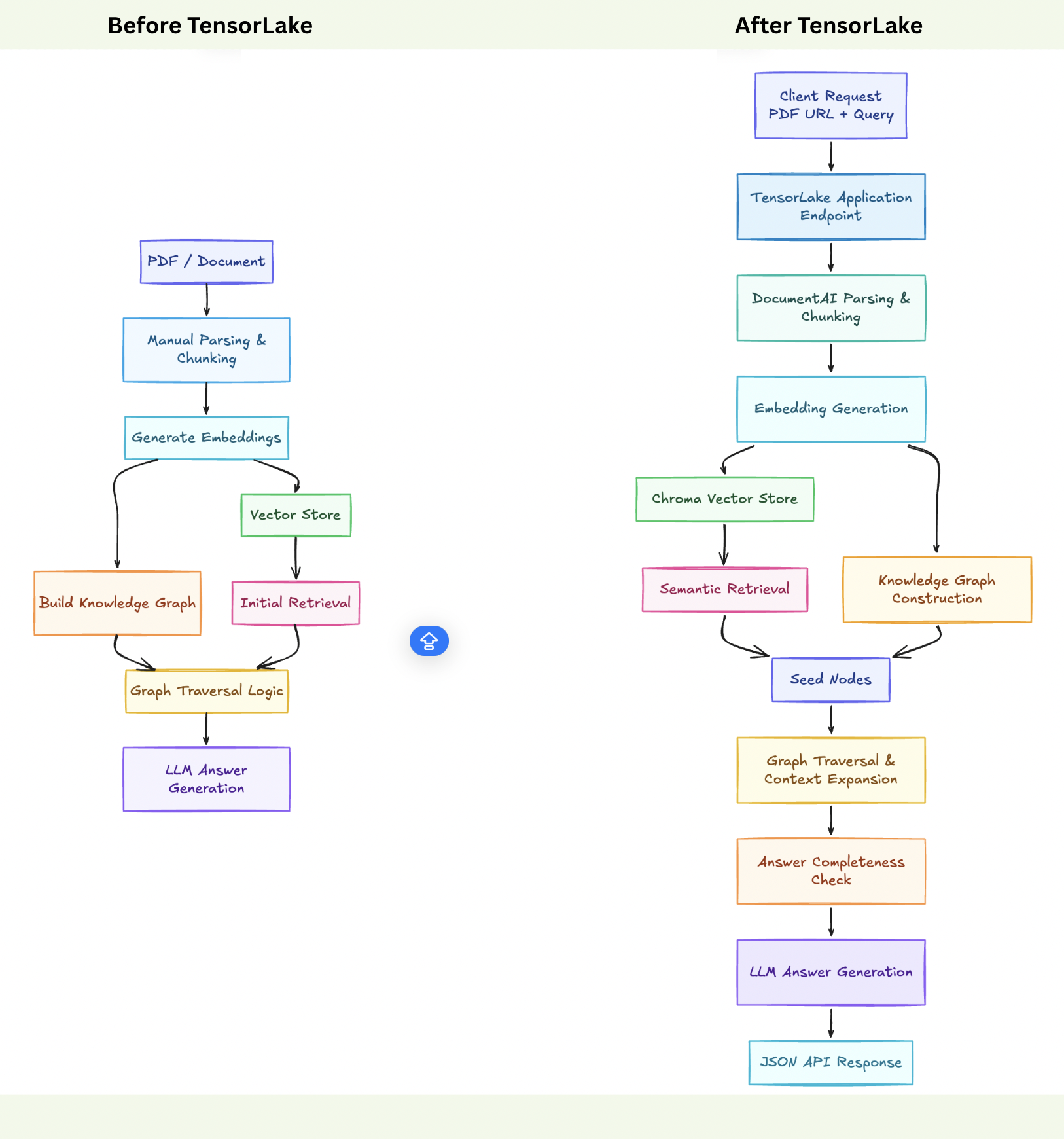
In this project, the core GraphRAG logic is adapted to run on Tensor Lake, reshaping the execution flow into a production-ready model.
In this project, the core GraphRAG logic is adapted to run on Tensor Lake, reshaping the execution flow into a production-ready model.
Document parsing, graph building, and querying are executed as managed steps, allowing the same GraphRAG idea to operate reliably, repeatably, and at scale without changing its fundamental reasoning design.
Prerequisites
The tutorial assumes familiarity with Python and a basic understanding of embeddings, vector search, and Retrieval-Augmented Generation. Prior exposure to graph-based retrieval concepts is helpful but not required.
The following requirements must be in place before proceeding:
- Python 3.10 or later
- An OpenAI API key for embeddings and language model inference
- A TensorLake account and API key for deployment and execution
- Basic knowledge of Python virtual environments and running scripts locally
No additional infrastructure or external services are required. Document parsing, execution, and deployment are handled by the TensorLake runtime.
Step-by-Step Execution
This section outlines how to execute the GraphRAG pipeline using TensorLake. For the complete and final implementation, refer to the full source file in this repo.
Step 1: Environment Setup
Begin by creating a dedicated Python environment to avoid dependency conflicts and ensure a reproducible setup.
Create and activate a virtual environment
macOS / Linux
python3 -m venv .venv
source .venv/bin/activate
Windows
python -m venv .venv
.venv\Scripts\activate
Install dependencies
Install all required libraries using the prepared requirements.txt.
pip install --upgrade pip
pip install -r requirements.txt
Download the spaCy language model
The knowledge graph relies on spaCy for concept and entity extraction. Download the model explicitly.
python -m spacy download en_core_web_smVerify setup
Confirm that the environment is ready by checking the Python version.
python --versionPython 3.10+ is recommended.
With the environment configured, the project is ready for code-level inspection and execution. The next step focuses on understanding the key components of the GraphRAG pipeline.
Step 2: Understanding the Code
This section walks through the code in logical blocks, explaining what each part does and how it fits into the overall GraphRAG execution flow.
1. Imports, Logging, and Global Configuration
import os
import logging
import hashlib
from typing import List, Dict, Tuple, Any
import heapq
from concurrent.futures import ThreadPoolExecutor, as_completed
from tqdm import tqdm
import numpy as np

from pydantic import BaseModel, Field
This block imports standard Python utilities for concurrency, graph traversal, hashing, and numerical computation. These are used throughout the GraphRAG pipeline for parallel concept extraction, priority-based graph traversal, and embedding similarity calculations.
logging.basicConfig(level=logging.ERROR)
logging.getLogger("httpx").setLevel(logging.ERROR)
logging.getLogger("chromadb").setLevel(logging.ERROR)
logging.getLogger("chromadb.telemetry").setLevel(logging.ERROR)
logging.getLogger("openai").setLevel(logging.ERROR)
logging.getLogger("tensorlake").setLevel(logging.ERROR)

os.environ["ANONYMIZED_TELEMETRY"] = "false"
Logging is restricted to the error level to avoid noisy output during execution. This is especially important when running inside TensorLake’s managed runtime, where clean logs improve request-level observability. ChromaDB telemetry is disabled to prevent background network calls.
2. TensorLake Container Image Definition
from tensorlake.applications import Image

image = (
    Image(base_image="python:3.12-slim")
    .run("apt-get update && apt-get install -y --no-install-recommends "
         "gcc g++ libstdc++6 libblas-dev liblapack-dev "
         "ca-certificates && rm -rf /var/lib/apt/lists/*")
    .run("pip install --no-cache-dir tensorlake chromadb langchain "
         "langchain-openai langchain-community openai "
         "networkx spacy tqdm numpy scikit-learn nltk pydantic python-dotenv")
    .run("python -m spacy download en_core_web_sm")
)
This block defines the execution environment used by TensorLake. A lightweight Python base image is extended with system libraries required for numerical and NLP workloads. All Python dependencies needed for document parsing, embeddings, graph processing, and LLM interaction are installed at build time.
The spaCy language model is downloaded during image creation, ensuring concept extraction is available immediately at runtime. TensorLake uses this image to guarantee consistent execution across local testing and cloud deployment.
3. Pydantic Models for Structured Data
class Concepts(BaseModel):
    concepts_list: List[str]
This model enforces structured output when extracting concepts using the language model. It ensures predictable parsing of LLM responses during graph construction.
class AnswerCheck(BaseModel):
    is_complete: bool
    answer: str
This model is used to validate whether the accumulated context is sufficient to answer the query. It plays a key role in deciding when graph traversal should stop.
class GraphRAGInput(BaseModel):
    pdf_url: str
    query: str
This model defines the API input contract for the TensorLake application. Using a single structured input allows the function to be exposed cleanly as an HTTP endpoint.
4. Knowledge Graph Initialization
class KnowledgeGraph:
    def __init__(self):
        import networkx as nx
        import spacy

        self.graph = nx.Graph()
        self.concept_cache: Dict[str, List[str]] = {}
        self.nlp = spacy.load("en_core_web_sm")
        self.edges_threshold = 0.78
This class initializes the semantic graph using NetworkX. spaCy is loaded once during container startup and reused across executions, which is critical for performance in TensorLake’s execution model.
A concept cache is maintained to reduce repeated LLM calls when processing similar content.
5. Graph Construction Logic
def build_graph(self, splits, llm, embedding_model):
    self._add_nodes(splits)
    embeddings = embedding_model.embed_documents(
        [s.page_content for s in splits]
    )
    self._extract_concepts(splits, llm)
    self._add_edges(embeddings)
This method builds the knowledge graph in three phases. Document chunks are added as nodes, embeddings are generated for similarity computation, and concepts are extracted using both spaCy and the language model. Finally, edges are added based on semantic similarity and shared concepts.
6. Concept Extraction with Controlled Concurrency
def _extract_concepts(self, splits, llm):
    with ThreadPoolExecutor(max_workers=2) as executor:
        futures = {
            executor.submit(
                self._extract_concepts_and_entities,
                split.page_content,
                llm
            ): i
            for i, split in enumerate(splits)
        }
Concept extraction is parallelized with a limited number of workers to avoid overwhelming the LLM API. This balance is important in production environments and aligns well with TensorLake’s fault-tolerant execution model.
7. Query Engine and Answer Validation
class QueryEngine:
    def __init__(self, vector_store, knowledge_graph, llm):
        self.vector_store = vector_store
        self.knowledge_graph = knowledge_graph
        self.llm = llm
The query engine connects ChromaDB, the knowledge graph, and the language model. It coordinates retrieval, graph traversal, and answer generation.
def _check_answer(self, query: str, context: str) -> bool:
    response = self.answer_check_chain.invoke(
        {"query": query, "context": context}
    )
    return response.is_complete
This method evaluates whether the accumulated context is sufficient. If not, traversal continues to neighboring nodes in the graph.
8. Graph-Based Context Expansion
def _expand_context(self, query, relevant_docs):
    priority_queue = [(0, node) for node in relevant_nodes]
    heapq.heapify(priority_queue)
Initial nodes are selected using vector similarity from ChromaDB. These nodes act as entry points into the graph.
for neighbor in self.knowledge_graph.graph.neighbors(current_node):
    edge_weight = self.knowledge_graph.graph[current_node][neighbor]["weight"]
Traversal expands to connected nodes based on edge weights, enabling multi-hop reasoning across related document sections rather than relying on a single retrieved chunk.
9. GraphRAG Orchestration Layer
class GraphRAG:
    def __init__(self):
        self.knowledge_graph = _GLOBAL_KNOWLEDGE_GRAPH
This class orchestrates document ingestion, embedding generation, graph construction, and querying. Heavy resources such as spaCy and the graph object are reused across executions.
from tensorlake.documentai import DocumentAI
self.doc_ai = DocumentAI()
TensorLake Document AI parses the PDF into structured, page-level chunks. This removes the need for custom PDF parsing logic and ensures consistent chunking across executions.
10. Vector Store Creation with ChromaDB
from langchain_community.vectorstores import Chroma

self.vector_store = Chroma.from_documents(
    documents=documents,
    embedding=self.embeddings,
    collection_name=collection_name,
    persist_directory=persist_dir,
)
ChromaDB stores embeddings and enables fast semantic retrieval. Retrieved chunks seed the graph traversal process rather than acting as the final answer source.
11. TensorLake Application Entrypoint
@application()
@function(image=image, secrets=["OPENAI_API_KEY", "TENSORLAKE_API_KEY"])
def graphrag_agent(input: GraphRAGInput) -> Dict:
This function defines the TensorLake application entrypoint. TensorLake handles container execution, secret injection, scaling, and API exposure. The function logic remains focused on GraphRAG reasoning.
return {"answer": result["answer"]}Only the final abstractive answer is returned to the client, keeping internal traversal details hidden.
12. Local Execution Entry Point
if __name__ == "__main__":
    request = run_local_application(
        graphrag_agent,
        GraphRAGInput(pdf_url=test_pdf_url, query=test_query),
    )
This block enables local testing using the same application function that is deployed to TensorLake. It validates the full pipeline before deployment, ensuring consistent behavior across environments.
Step 3: Export API Keys for Local Execution
Before running the application locally, the required API keys must be available as environment variables. These keys allow access to the LLM provider and the managed execution platform.
macOS / Linux
export OPENAI_API_KEY=your_openai_api_keyexport
export TENSORLAKE_API_KEY=your_tensorlake_api_key
Windows (PowerShell)
setx OPENAI_API_KEY "your_openai_api_key"
setx TENSORLAKE_API_KEY "your_tensorlake_api_key"
After exporting the variables, restart the terminal session to ensure the values are available to the runtime.
Step 4: Testing GraphRAG Locally
Local validation is performed using the execution block defined under __main__.
The test run uses:
- PDF URL:
https://arxiv.org/pdf/1706.03762.pdf(Attention Is All You Need) - Query: “What is the main contribution of the paper?”
Run the application with:
python tensorlake_graphrag.pyThis command executes the complete GraphRAG pipeline locally. The flow includes PDF parsing, chunk creation, embedding generation, vector indexing with ChromaDB, graph construction, and final answer synthesis.
A successful response confirms that document ingestion, retrieval, graph traversal, and abstractive answering work as expected. With local validation complete, the system is ready for deployment.
Step 5: Pre-Deployment Setup
Before deploying the GraphRAG application, required secrets must be configured so the runtime can securely access external services.
Two API keys are required:
- TensorLake API key for application execution and orchestration
- OpenAI API key for embeddings and LLM inference
Set the secrets using the TensorLake CLI:
tensorlake secretsset TENSORLAKE_API_KEY=<your_tensorlake_key>
tensorlake secretsset OPENAI_API_KEY=<your_openai_key>
Verify that the secrets are registered correctly:
tensorlake secrets listOnce verified, the application is ready to be deployed to the TensorLake runtime.
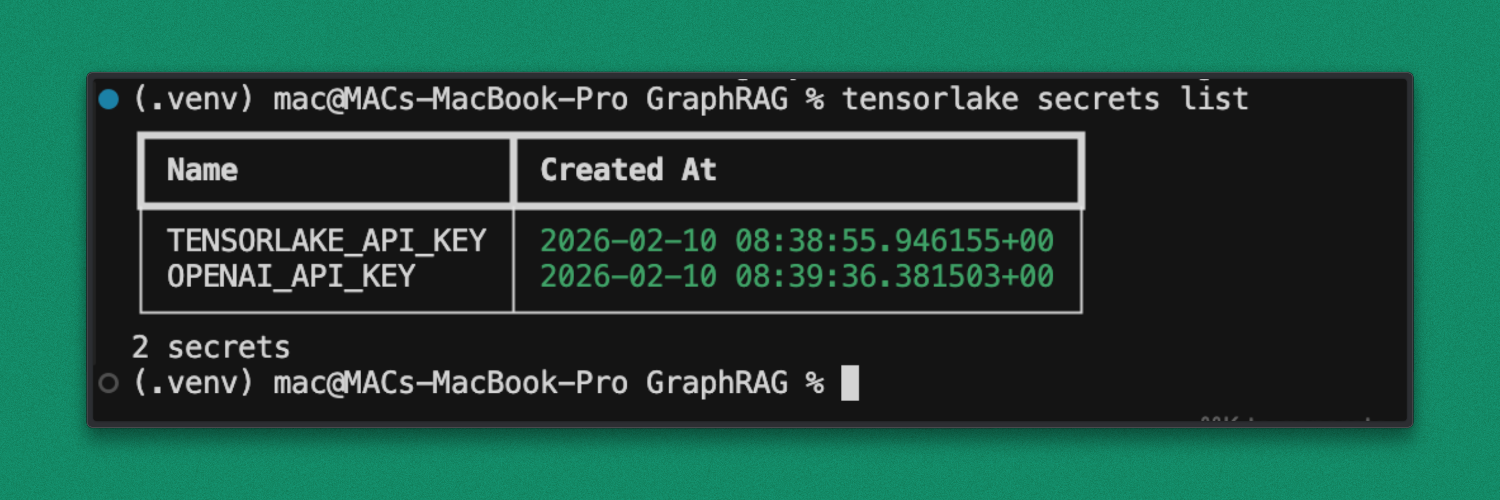
Once verified, the application is ready to be deployed to the TensorLake runtime.
Step 6: Deployment
Deploy the GraphRAG application using the TensorLake CLI:
tensorlake deploy tensorlake_graphrag.pyThis command builds the container image and deploys the graphrag_agent as an API endpoint.
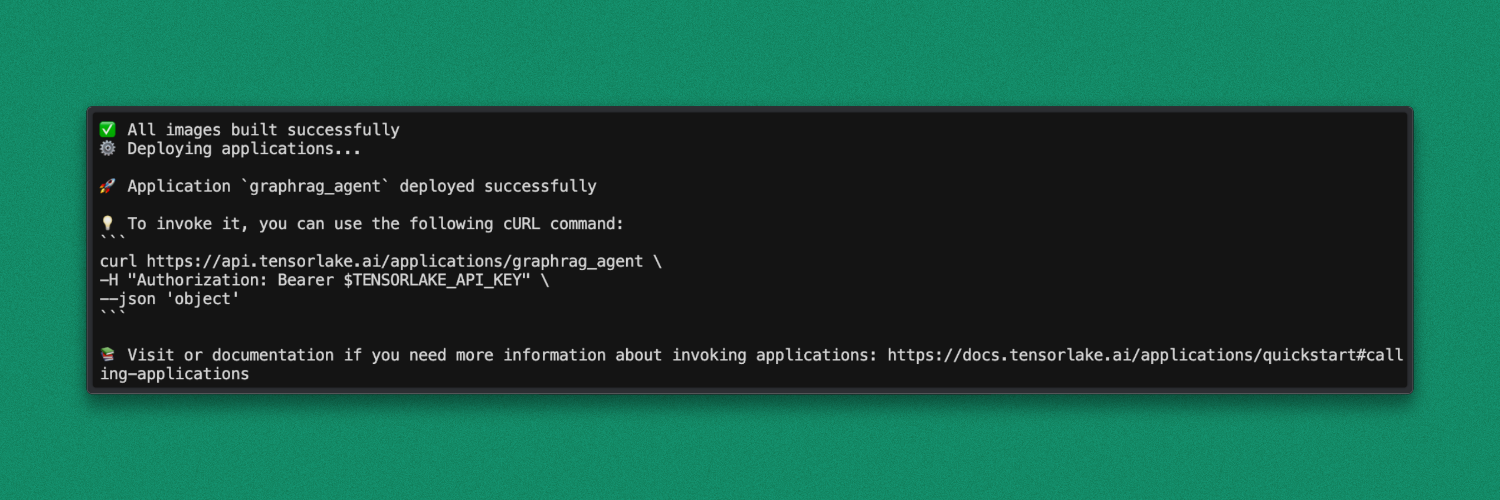
After deployment, the application is ready to accept requests.
Step 7: Testing the Deployed Endpoint
Once deployment is complete, the GraphRAG application is accessible as a hosted API endpoint.
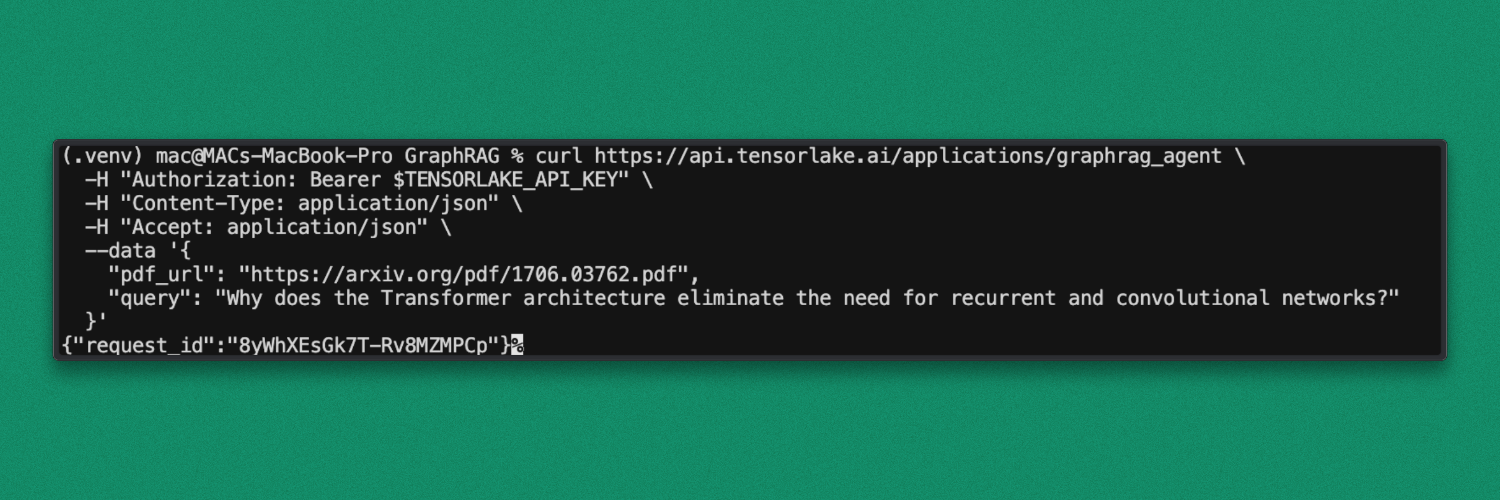
Test the deployment by sending a request with the PDF URL and query used earlier:
- PDF URL:
https://arxiv.org/pdf/1706.03762.pdf(Attention Is All You Need) - Query: Why does the Transformer architecture eliminate the need for recurrent and convolutional networks?
Request:
curl https://api.tensorlake.ai/applications/graphrag_agent \
  -H "Authorization: Bearer $TENSORLAKE_API_KEY" \
  -H "Content-Type: application/json" \
  -H "Accept: application/json" \
  --data '{
    "pdf_url": "https://arxiv.org/pdf/1706.03762.pdf",
    "query": "Why does the Transformer architecture eliminate the need for recurrent and convolutional networks?"
  }'
After executing the query, the request is accepted by the deployed endpoint and a request ID is returned in the response. This request ID can be used to track execution status and inspect logs in the dashboard.
Response:
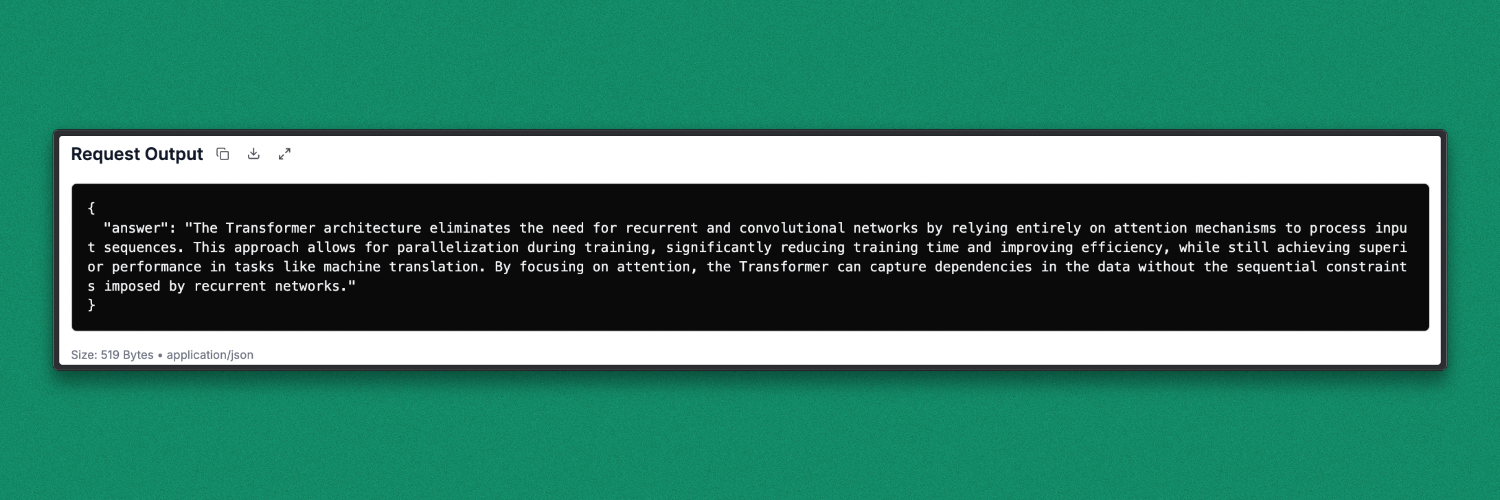
Using this request ID, request details such as request output, execution time, runtime status, and logs can be viewed directly in the TensorLake cloud dashboard. This makes it easy to debug, monitor performance, and verify successful execution.
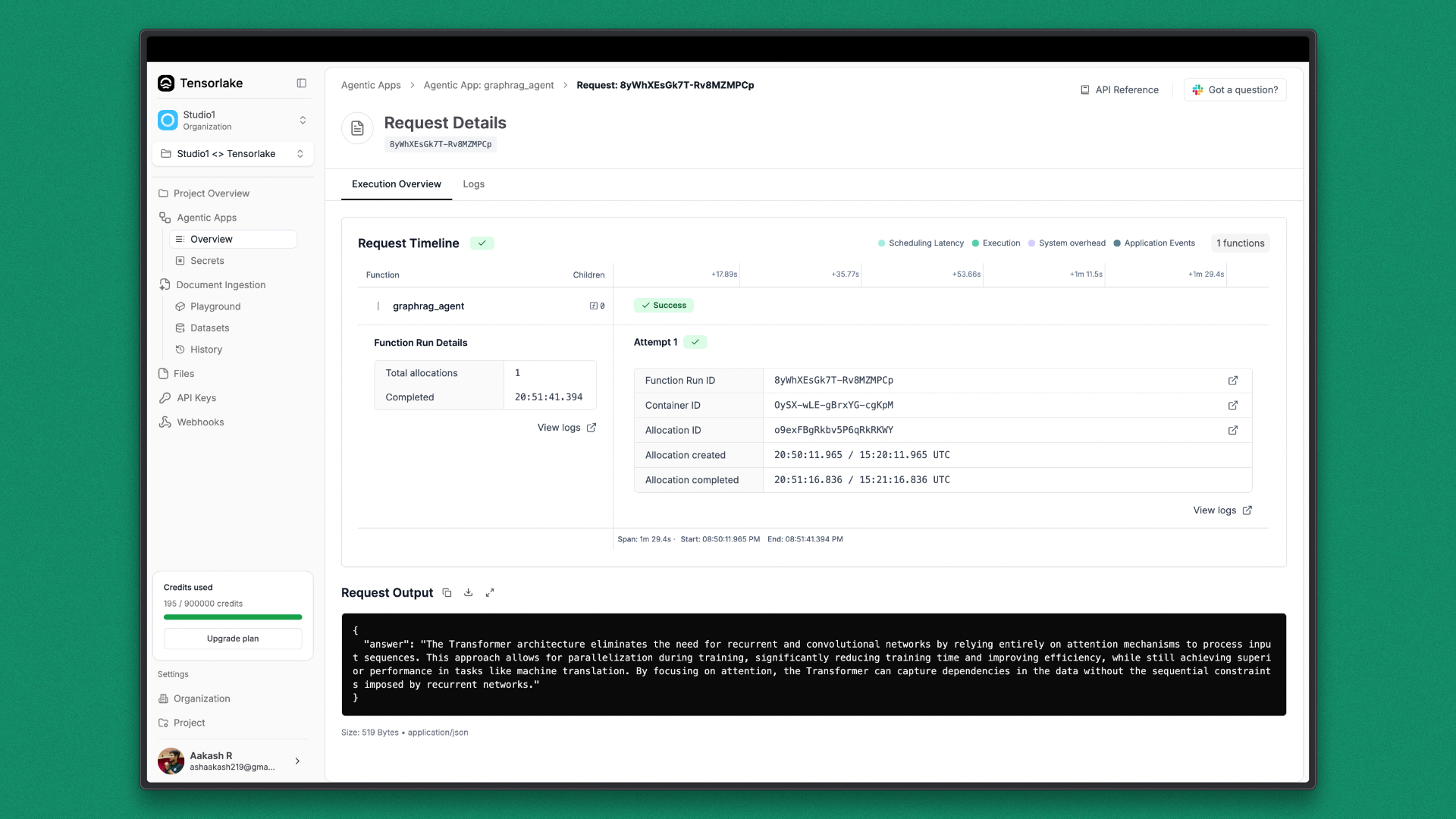
Result
The deployed GraphRAG endpoint returns a concise, abstractive answer generated from the parsed research paper. The response is produced by combining vector-based retrieval with graph traversal and language model reasoning.
Benefits of Using TensorLake for Building GraphRAG
TensorLake provides the infrastructure and tooling required to run GraphRAG pipelines reliably, from document ingestion to production deployment.
- Document AI for Structured Ingestion: Built-in Document AI handles complex PDFs, tables, and layouts without manual preprocessing.
- Consistent Containerized Execution: Container-based workflows ensure the same behavior in local development and cloud deployments.
- Secure Secret Management: Native secret handling removes the need for hardcoded API keys and environment hacks.
- Simple and Scalable Deployment: GraphRAG pipelines can be deployed as callable APIs with minimal operational overhead.
- Request Observability and Debugging: Each request exposes execution logs, timing details, and failure diagnostics in the cloud console.
- Designed for Modern RAG and Agent Systems: The platform aligns well with graph-based retrieval, multi-step reasoning, and agent-driven workflows.
Conclusion
TensorLake makes it practical to run GraphRAG systems beyond experiments. By handling document ingestion, structured parsing, containerized execution, secrets management, and deployment as a managed API, it removes much of the operational overhead that typically surrounds advanced RAG pipelines.
With TensorLake, GraphRAG moves from a complex research setup to a deployable system that can be tested locally, deployed consistently, and monitored in production. This combination is especially important for modern AI systems that rely on multi-step retrieval, graph reasoning, and large documents, where reliability, scalability, and observability are as critical as model performance.

Related articles


Get server-less runtime for agents and data ingestion

Tensorlake is the Agentic Compute Runtime the durable serverless platform that runs Agents at scale.
“With Tensorlake, we've been able to handle complex document parsing and data formats that many other providers don't support natively, at a throughput that significantly improves our application's UX. Beyond the technology, the team's responsiveness stands out, they quickly iterate on our feedback and continuously expand the model's capabilities.”
.png)
"At SIXT, we're building AI-powered experiences for millions of customers while managing the complexity of enterprise-scale data. TensorLake gives us the foundation we need—reliable document ingestion that runs securely in our VPC to power our generative AI initiatives."
.png)
“Tensorlake enabled us to avoid building and operating an in-house OCR pipeline by providing a robust, scalable OCR and document ingestion layer with excellent accuracy and feature coverage. Ongoing improvements to the platform, combined with strong technical support, make it a dependable foundation for our scientific document workflows.”

"For BindHQ customers, the integration with Tensorlake represents a shift from manual data handling to intelligent automation, helping insurance businesses operate with greater precision, and responsiveness across a variety of transactions"

“Tensorlake let us ship faster and stay reliable from day one. Complex stateful AI workloads that used to require serious infra engineering are now just long-running functions. As we scale, that means we can stay lean—building product, not managing infrastructure.”