Agentic Key/Value Extraction
Template-Free Form Extraction with Agentic Key/Value Intelligence
At Tensorlake, we're excited to announce a powerful new capability in our document parsing pipeline: Agentic Key/Value Extraction.
Agentic Key/Value Extraction intelligently detects and processes forms within documents, extracting structured field data without requiring manual templates or brittle coordinate-based parsing. Whether you're processing loan applications, insurance claims, medical surveys, or compliance questionnaires, you can now automatically extract structured data from any form layout.
Key Capabilities
- Intelligent form detection: Automatically identifies form elements within documents, avoiding expensive extraction on non-form content
- Layout-agnostic extraction: Works across variable form layouts without manual template configuration
- Structured field data: Returns JSON with field names, types, values, and optional box IDs ready for validation and downstream processing
- Multi-field type support: Handles text inputs, checkboxes, radio buttons, dropdowns, and signature lines
- Cost efficient: Only invokes expensive vision models on actual forms, skipping tables, text, and illustrations
The Problem: Forms Are Structurally Diverse
Forms are everywhere in enterprise documents—loan applications, insurance claims, medical surveys, and compliance questionnaires. Yet processing them remains a challenge because forms have no standard layout. A checkbox on one form sits in a different position on another. Field order changes. Some forms are scanned images while others are born-digital PDFs.
Extracting structured data from forms used to require either:
- Manual template definition - Build a new extractor for every form variant
- Brittle OCR - Fragile coordinate-based parsing that breaks on layout variations
- Undiscriminating extraction - Running expensive vision models on every image in a document, paying inference costs whether it's a form, table, chart, diagram, or just a logo
None of these approaches scales to enterprise document volumes where forms arrive in unpredictable layouts, sometimes mixed with other document types in a single file.
Consider a form that looks like a W-2 document:
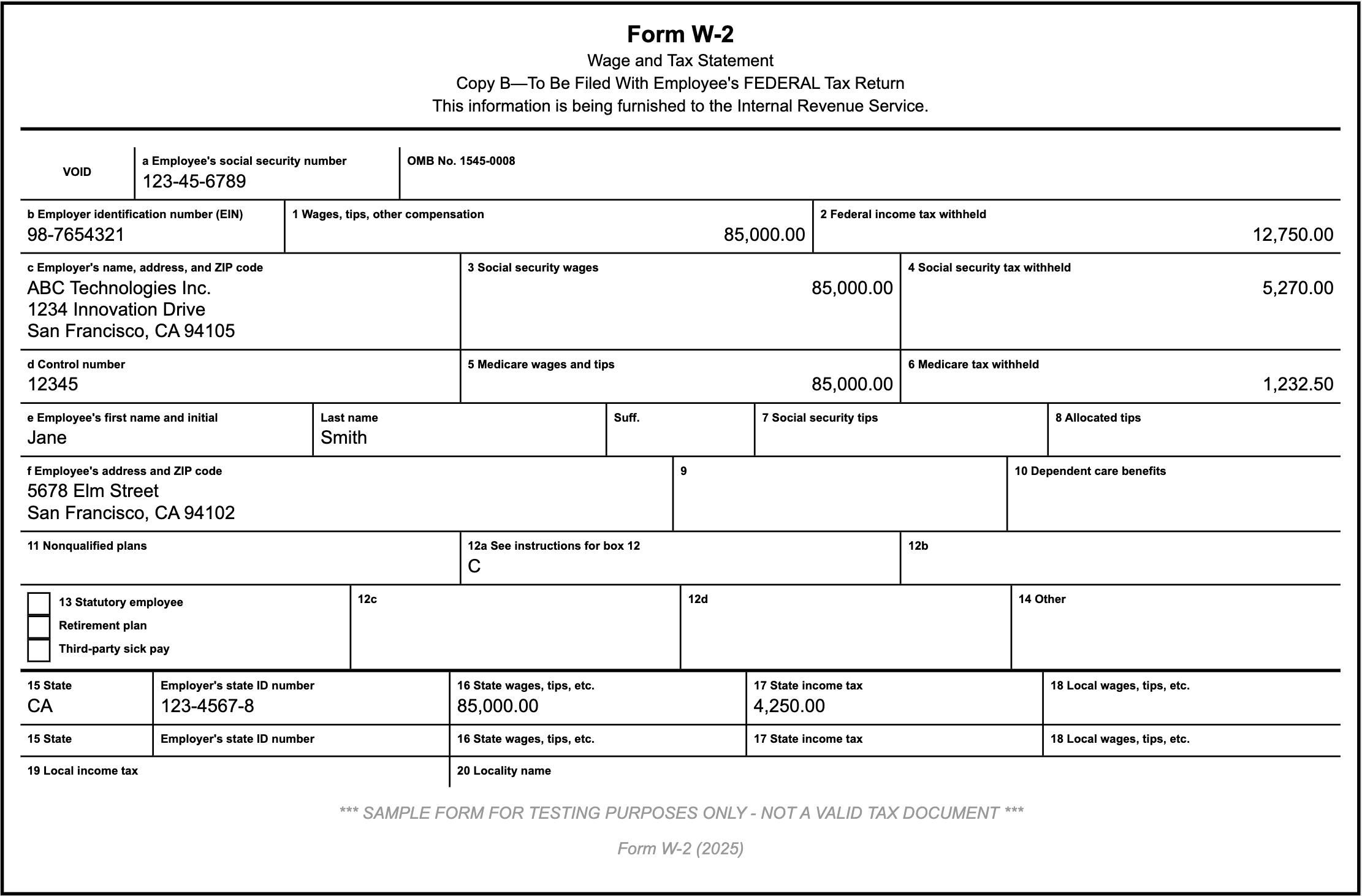
The challenges:
- Variable positioning: Fields are not in a grid; they flow around text, images, and whitespace
- Diverse field types: Text inputs, checkboxes, radio buttons, dropdowns, and signature lines coexist
- Unclear labels: Field names might be adjacent, above, or implicit
- Missing structure: Scanned forms have no underlying markup to rely on
- Mixed content: A single page might have headers, instructions, forms, and footers
Handling this with handwritten templates or coordinate-based extraction is expensive and breaks when layouts change.
The Solution: Two-Stage Intelligent Processing
Tensorlake's agentic form extraction solves this by layering two intelligent operations:
1. Form Detection: Is This Really a Form?
Not every image in a document is a form. Some pages show tables, some are text-heavy articles, others are illustrations. Running expensive vision models on everything is wasteful.
The first step is smart detection. When Tensorlake encounters a layout component, it uses a lightweight vision model to ask: "Is this a form?"
If the answer is no, the pipeline skips expensive extraction and moves on. If yes, it proceeds to structured field extraction.
Why this matters in production:
- Cost efficiency: You only invoke expensive extraction models on actual forms
- Speed: Non-form images process instantly without unnecessary API calls
- Accuracy: Detection is a binary decision, harder to get wrong than extraction
2. Agentic Field Extraction: Structured Data from Any Layout
Once a form is identified, our agentic approach extracts its fields intelligently. Unlike template-based systems that rely on fixed coordinates, our agent reasons about:
- Spatial relationships: Understanding which labels correspond to which input fields
- Visual cues: Recognizing checkboxes, radio buttons, and text boxes by appearance
- Context: Inferring field purpose from surrounding text and document structure
- Multi-field patterns: Grouping related fields (e.g., address components, checkbox groups)
For each form, Tensorlake generates a structured JSON response containing:
- Field name: The label or purpose of the field (e.g., "Email Address", "Employment Status")
- Type: The input type (e.g., "text", "checkbox", "radio button")
- Field value: The current content (e.g., "john@example.com", "true" for checked boxes)
- Box ID (optional): A reference ID if the form has labeled field boxes, which helps grounding the information in the form
Example Output
Extracted JSON
[
  {
    "box_id": "a",
    "field_name": "Employee's social security number",
    "type": "text",
    "value": "123-45-6789"
  },
  {
    "box_id": "b",
    "field_name": "Employer identification number (EIN)",
    "type": "text",
    "value": "98-7654321"
  },
  {
    "box_id": "1",
    "field_name": "Wages, tips, other compensation",
    "type": "text",
    "value": "85,000.00"
  },
  {
    "box_id": "2",
    "field_name": "Federal income tax withheld",
    "type": "text",
    "value": "12,750.00"
  },
  {
    "box_id": "c",
    "field_name": "Employer's name, address, and ZIP code",
    "type": "text",
    "value": "ABC Technologies Inc. 1234 Innovation Drive San Francisco, CA 94105"
  },
  {
    "box_id": "3",
    "field_name": "Social security wages",
    "type": "text",
    "value": "85,000.00"
  },
  {
    "box_id": "4",
    "field_name": "Social security tax withheld",
    "type": "text",
    "value": "5,270.00"
  },
  {
    "box_id": "d",
    "field_name": "Control number",
    "type": "text",
    "value": "12345"
  },
  ...
Markdown Representation
This JSON is also converted to readable markdown for easy review:
[a] **Employee's social security number** (text): 123-45-6789

[b] **Employer identification number (EIN)** (text): 98-7654321

[1] **Wages, tips, other compensation** (text): 85,000.00

[2] **Federal income tax withheld** (text): 12,750.00

[c] **Employer's name, address, and ZIP code** (text): ABC Technologies Inc. 1234 Innovation Drive San Francisco, CA 94105

[3] **Social security wages** (text): 85,000.00

[4] **Social security tax withheld** (text): 5,270.00

[d] **Control number** (text): 12345

...
Why structured extraction is better:
- Downstream ready: Downstream systems consume JSON directly without parsing text
- Type information: Field type is explicit, so validation is straightforward
- Traceable: Box IDs link extracted fields back to source locations
- Scalable: The same extraction pipeline works for forms of any layout
Availability
Form extraction is currently available in all OCR models. Forms are automatically detected and extracted when the enrichment option is enabled.
SDK Usage
Install or update to the latest version of tensorlake:
pip install --upgrade tensorlakeYou can enable key/value extraction from forms in your parse request by selecting it as an enrichment option:
from tensorlake.documentai import DocumentAI
from tensorlake.documentai.models.options import (
    EnrichmentOptions,
)

enrichment_options = EnrichmentOptions(
    key_value_extraction=True,
)

doc_ai = DocumentAI(api_key=API_KEY)

parse_id = doc_ai.read(
    file_id="file_XXX",  # Replace with your file ID or URL
    enrichment_options=enrichment_options,
)
API Usage
You can enable key/value extraction from forms in your parse request by selecting it as an enrichment option:
// POST /api/v2/parse
{
    "enrichment_options": {
        "key_value_extraction": true
    }
}
Get Started
Ready to automate your form processing? Enable form extraction in your next parse request and eliminate manual data entry from your document workflows.

Related articles


Get server-less runtime for agents and data ingestion

Tensorlake is the Agentic Compute Runtime the durable serverless platform that runs Agents at scale.
“With Tensorlake, we've been able to handle complex document parsing and data formats that many other providers don't support natively, at a throughput that significantly improves our application's UX. Beyond the technology, the team's responsiveness stands out, they quickly iterate on our feedback and continuously expand the model's capabilities.”
.png)
"At SIXT, we're building AI-powered experiences for millions of customers while managing the complexity of enterprise-scale data. TensorLake gives us the foundation we need—reliable document ingestion that runs securely in our VPC to power our generative AI initiatives."
.png)
“Tensorlake enabled us to avoid building and operating an in-house OCR pipeline by providing a robust, scalable OCR and document ingestion layer with excellent accuracy and feature coverage. Ongoing improvements to the platform, combined with strong technical support, make it a dependable foundation for our scientific document workflows.”

"For BindHQ customers, the integration with Tensorlake represents a shift from manual data handling to intelligent automation, helping insurance businesses operate with greater precision, and responsiveness across a variety of transactions"

“Tensorlake let us ship faster and stay reliable from day one. Complex stateful AI workloads that used to require serious infra engineering are now just long-running functions. As we scale, that means we can stay lean—building product, not managing infrastructure.”