Introducing Agentic Form Filling: Automating Document Data Entry
TL;DR
- With Tensorlake you can now fill PDF forms automatically using layout-aware widget detection and LLM-based mapping of key-value pairs.
- It works for PDFs that provide fillable widgets and for image-based scanned forms by grounding every field with bounding boxes and labels.
- You send a
form filling promptand the document you want to get automatically filled. You get back a filled PDF plus metadata you can use for review, auditing, and retries.
This post introduces Tensorlake’s agentic form filling: an end-to-end pipeline that detects form widgets, understands what each field means, and fills the PDF reliably from a natural-language prompt.
Manually form filling typically implies collecting information from several sources (e.g. documents, emails, databases, …) and then fill the fields in a form, carefully matching the information that needs to be filled. Furthermore, in some cases, the forms might be scanned documents, which means that need to be filled by hand and then might require additional scanning after filling.
At Tensorlake, we have considered the lifecycle for form filling and provided a solution that can deal with fillable and scanned forms, allowing specifying the content to be added to the form using a prompt, which may contain a detailed set of fields and values in JSON format, or simply a set of instructions in natural language. The request is processed by Tensorlake, the form is analysed, widgets are added if not in the form and then filled. The filled PDF is available for download once the process finishes.
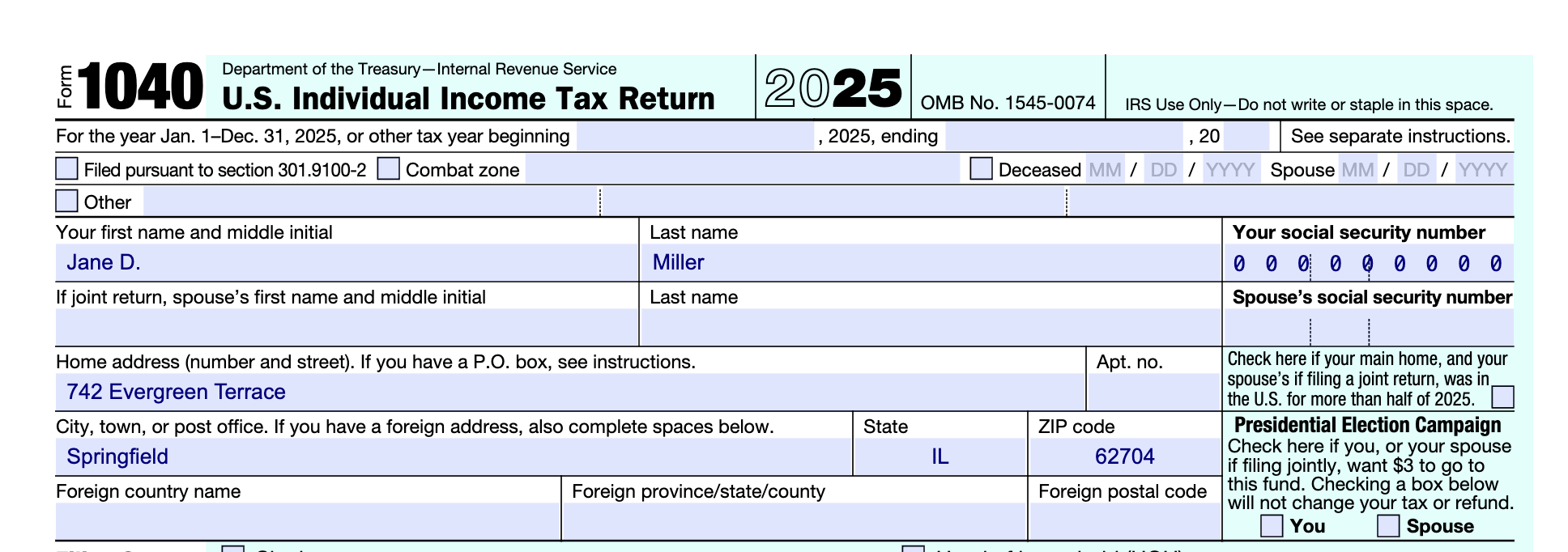
Imagine that you need to fill your f1040 tax return form. We show how it could be automated with Tensorlake. Below you can find fictitious data from a person that does not exist, this information can be provided as such to Tensorlake’s agentic form filling.
Fill the form f1040 with the following information:

Filing Status: Single

Taxpayer Name: Jane D. Miller

Social Security Number: 000 00 0000

Home Address: 742 Evergreen Terrace, Springfield, IL 62704

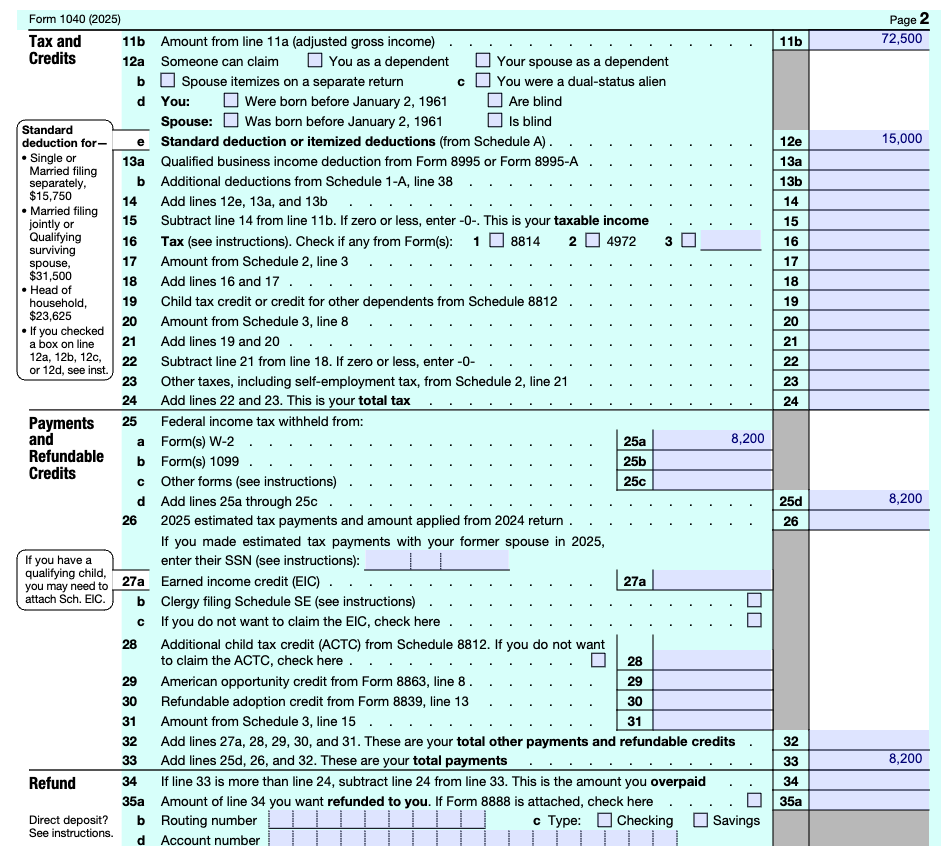
Wages, Salaries, and Tips: $72,500

Tax-Exempt Interest: $0

Standard Deduction: Single ($15,000 for 2025/2026 tax year)

Federal Income Tax Withheld: $8,200

Refund/Owe: Refund
After being processed by Tensorlake, a filled f1040 is produced. This is the first page where the personal data of the fictitious person is used to fill it.
And this is the second page where financial information is being added:
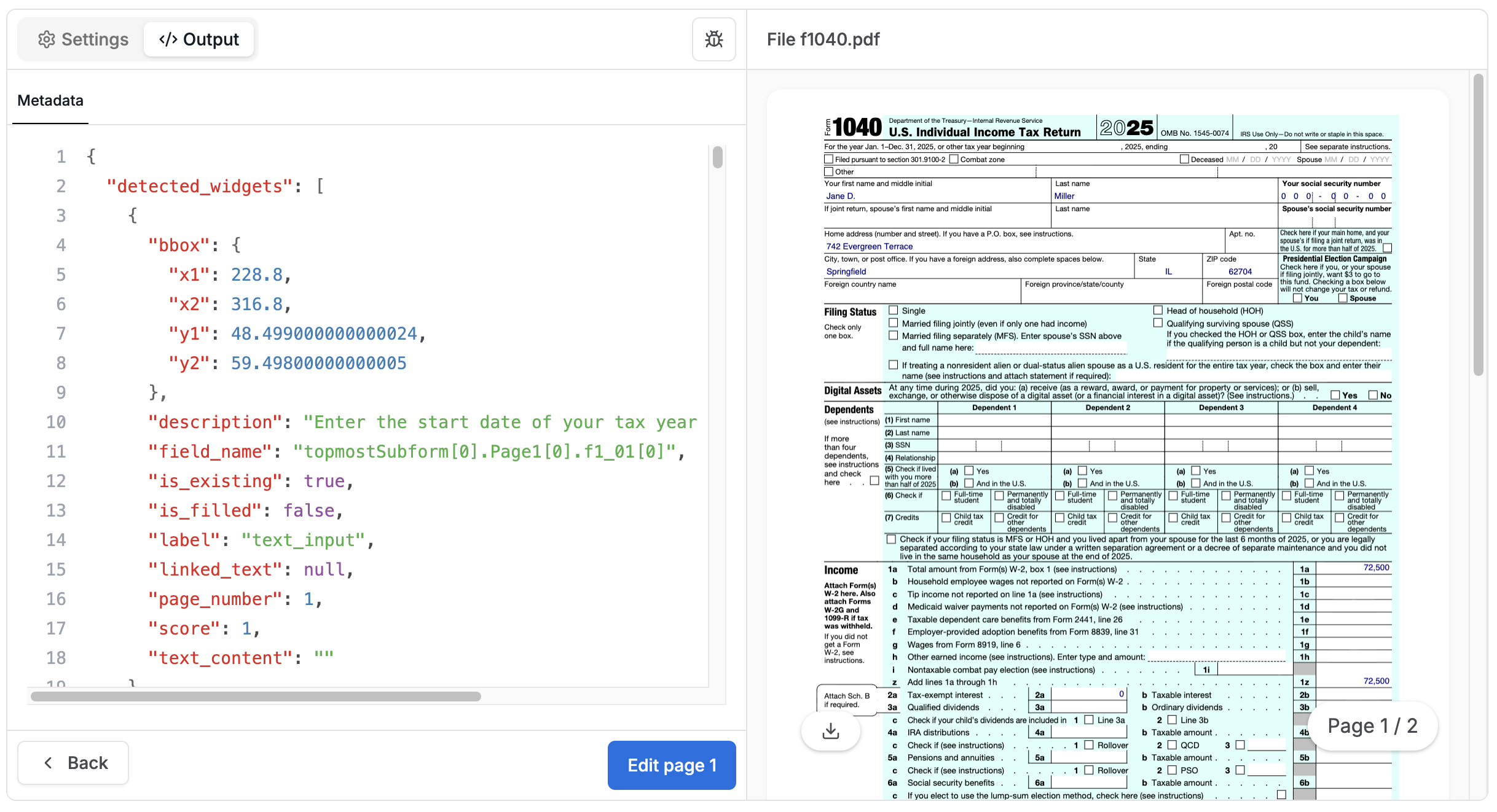
This would be a snapshot of the generated metadata for this example:
"form_filling_metadata": {
        "detected_widgets": [
            ...
            {
                "label": "text_input",
                "score": 1.0,
                "bbox": {
                    "x1": 36.0,
                    "y1": 93.99900000000002,
                    "x2": 251.25,
                    "y2": 108.0
                },
                "linked_text": null,
                "is_filled": false,
                "page_number": 1,
                "is_existing": true,
                "description": "Enter your first name and middle initial.",
                "text_content": "Jane D.",
                "field_name": "topmostSubform[0].Page1[0].f1_14[0]"
            },
            {
                "label": "text_input",
                "score": 1.0,
                "bbox": {
                    "x1": 253.0,
                    "y1": 93.99900000000002,
                    "x2": 467.25,
                    "y2": 108.0
                },
                "linked_text": null,
                "is_filled": false,
                "page_number": 1,
                "is_existing": true,
                "description": "Enter your last name.",
                "text_content": "Miller",
                "field_name": "topmostSubform[0].Page1[0].f1_15[0]"
            },
            {
                "label": "text_input",
                "score": 1.0,
                "bbox": {
                    "x1": 469.0,
                    "y1": 93.99900000000002,
                    "x2": 576.0,
                    "y2": 108.0
                },
                "linked_text": null,
                "is_filled": false,
                "page_number": 1,
                "is_existing": true,
                "description": "Enter your social security number.",
                "text_content": "000000000",
                "field_name": "topmostSubform[0].Page1[0].f1_16[0]"
            },
            ...
       ]
 }
Why “Agentic” Form Filling?
Unlike rule-based PDF automation tools, Tensorlake’s pipeline:
- reasons about field semantics rather than relying on exact field names
- resolves ambiguities when multiple fields appear similar
- applies type-aware logic (checkbox vs text vs numeric)
- grounds every fill decision in bounding boxes
- returns structured metadata for auditing and validation
This makes it suitable for production document workflows, not just static template automation.
How it works
Here's a high level explanation, which starts with a overall visual diagram of the form-filling pipeline:
┌─────────────────┐
│   Upload PDF    │
└────────┬────────┘
         │
         ▼
┌─────────────────┐
│ Detect Widgets  │
│  (text inputs,  │
│  checkboxes,    │
│  radio buttons) │
└────────┬────────┘
         │
         ▼
┌─────────────────┐
│Associate Labels │
│ (link nearby    │
│  text to each   │
│  widget)        │
└────────┬────────┘
         │
         ▼
┌─────────────────┐
│   Map Data      │
│ (match prompt   │
│  values to      │
│  fields)        │
└────────┬────────┘
         │
         ▼
┌─────────────────┐
│   Fill PDF      │
│ (write values   │
│  into widgets)  │
└────────┬────────┘
         │
         ▼
┌─────────────────┐
│ Return Output   │
│  + Metadata     │
└─────────────────┘
The pipeline follows six steps, matching the diagram above:
- Upload PDF: provide the form document
- Detect Widgets: identify fillable elements (text inputs, checkboxes, radio buttons, signature fields)
- Associate Labels: link nearby text to each widget
- Map Data: match prompt values to fields
- Fill PDF: write values into widgets
- Return Output: deliver filled PDF and metadata
Under the hood, steps 2-4 involve two key technical processes:
1) Widget detection (grounded in the document)
We first detect the fillable elements on the page and represent each as a typed widget with geometry:
- text inputs
- checkboxes
- radio buttons
This step produces bounding boxes for each widget, which means every decision downstream is grounded in a real location on the page.
It supports:
- AcroForms when the PDF contains a form structure with editable widgets
- scanned / image-based forms by running vision-based detection
2) Semantic mapping (from your input to the right fields)
Detection alone is not enough. The hard part is mapping "Applicant name" in your prompt to "Name of borrower (print)" on the form, or choosing the right checkbox when options are phrased differently.
We handle this by:
- Label association: identify the label text that describes each widget
- Type-aware filling: treat widgets according to type
- text for input fields
- booleans for checkboxes and radio buttons
- LLM-based reasoning: map your values to the best matching fields, even with synonyms and formatting differences
Availability
Form filling is currently available from Tensorlake.
SDK Usage
Install or update to the latest version of tensorlake:
pip install --upgrade tensorlakeYou can enable form filling in your edit request by selecting it as a form filling option:
from tensorlake.documentai import DocumentAI
from tensorlake.documentai.models.options import (
    FormFillingOptions,
)

form_filling_options = FormFillingOptions(
    fill_prompt="The first name is John and the last name is Doe. He did not have any income last year. Fill the form accordingly."
)

doc_ai = DocumentAI(api_key=API_KEY)

parse_id = doc_ai.edit(
    file_id="file_XXX",  # Replace with your file ID or URL
    form_filling_options=form_filling_options,
)
API Usage
You can enable form filling in your edit request:
// POST /api/v2/edit
{
    "form_filling_options": {
        "fill_prompt": "The first name is John and the last name is Doe. He did not have any income last year. Fill the form accordingly."
    }
}
Once the job finishes, the PDF is return as a base64 string. You can recover the filled PDF getting the parse result from the Tensorlake server. Here is an example code:
# If you already have a parse_id from a successful operation:
parse_id = "parse_xxx"

# Retrieve the result directly
result = doc_ai.get_parsed_result(parse_id)

if result.status == ParseStatus.SUCCESSFUL:
    print("Operation completed successfully.")

    if result.filled_pdf_base64:
        print("Decoding and saving PDF...")
        pdf_data = base64.b64decode(result.filled_pdf_base64)
        with open("output.pdf", "wb") as f:
            f.write(pdf_data)
        print("Saved filled PDF to output.pdf")

    if result.form_filling_metadata:
        print("Saving form filling metadata...")
        with open("output.json", "w", encoding="utf-8") as f:
            json.dump(result.form_filling_metadata, f, indent=4)
        print("Saved form filling metadata to output.json")

    # Save the full result as JSON
    with open("full_result.json", "w", encoding="utf-8") as f:
        f.write(result.model_dump_json(indent=4))
    print("Saved full result to full_result.json")
else:
    print(f"Operation failed with status: {result.status}")
    if result.error:
        print(f"Error: {result.error}")
A screenshot of the form editing in Tensorlake user interface.

Related articles


Get server-less runtime for agents and data ingestion

Tensorlake is the Agentic Compute Runtime the durable serverless platform that runs Agents at scale.
“With Tensorlake, we've been able to handle complex document parsing and data formats that many other providers don't support natively, at a throughput that significantly improves our application's UX. Beyond the technology, the team's responsiveness stands out, they quickly iterate on our feedback and continuously expand the model's capabilities.”
.png)
"At SIXT, we're building AI-powered experiences for millions of customers while managing the complexity of enterprise-scale data. TensorLake gives us the foundation we need—reliable document ingestion that runs securely in our VPC to power our generative AI initiatives."
.png)
“Tensorlake enabled us to avoid building and operating an in-house OCR pipeline by providing a robust, scalable OCR and document ingestion layer with excellent accuracy and feature coverage. Ongoing improvements to the platform, combined with strong technical support, make it a dependable foundation for our scientific document workflows.”

"For BindHQ customers, the integration with Tensorlake represents a shift from manual data handling to intelligent automation, helping insurance businesses operate with greater precision, and responsiveness across a variety of transactions"

“Tensorlake let us ship faster and stay reliable from day one. Complex stateful AI workloads that used to require serious infra engineering are now just long-running functions. As we scale, that means we can stay lean—building product, not managing infrastructure.”